ArchiMate is a modelling language for describing how a business, its applications and its technology fit together, using one consistent set of shapes and connections.
What it is
ArchiMate is an open standard published by The Open Group. It began as a Dutch research project in the early 2000s and has been an Open Group standard since 2009. It is designed to work alongside TOGAF, but can be used with any architecture approach.
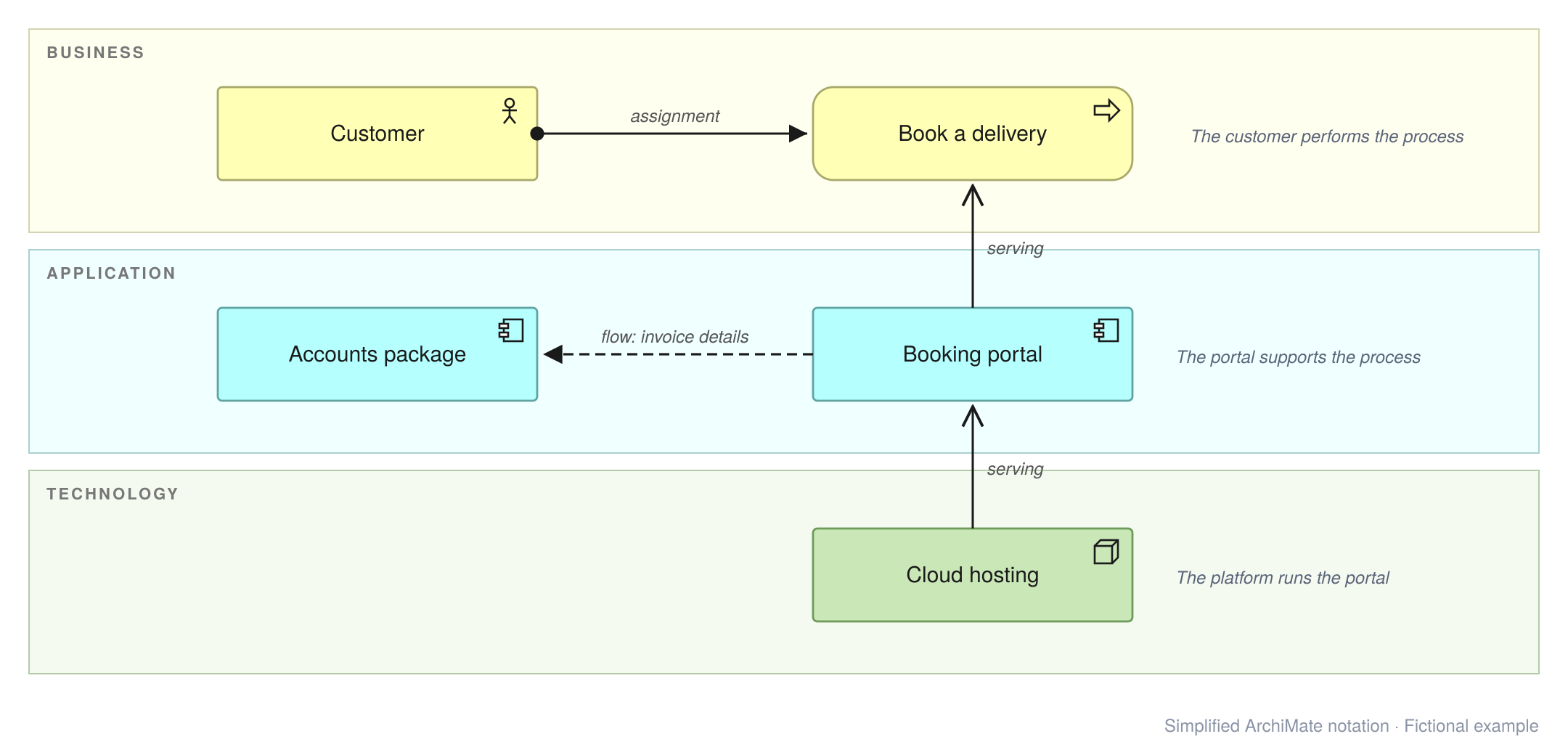
Where a general-purpose diagram uses whatever boxes and arrows come to hand, ArchiMate defines what each shape and line means. A box marked as an application component, connected by a serving relationship to a business role, says something precise: this software supports that role. Diagrams become consistent, and they can be built from a single underlying model rather than drawn one at a time.
Key parts
Layers
The core of the language describes an organisation in three layers:
| Layer | Describes | Examples |
|---|---|---|
| Business | People, roles, processes and the services the business offers | Customer, planner, “book a delivery” |
| Application | Software, the services it provides and the data it holds | Booking portal, accounts package, order data |
| Technology | Infrastructure and platforms the applications run on | Servers, cloud hosting, databases |
Further elements cover motivation (drivers, goals, principles and requirements), strategy (capabilities and resources), and implementation and migration (work packages and plateaus for planning change).
Elements
Within each layer, elements fall into three broad kinds: active structure (who or what does something, such as a role or application component), behaviour (what is done, such as a process or service) and passive structure (what is acted on, such as a business or data object).
Relationships
Relationships connect elements and carry meaning. Commonly used ones include:
- Serving – one element provides its functionality to another, e.g. an application serves a business role.
- Realisation – one element brings another into being, e.g. a process realises a service.
- Assignment – who or what performs a behaviour, e.g. a role is assigned to a process.
- Access – behaviour reads or writes data.
- Flow and triggering – transfer of information, or one step causing the next.
- Composition and aggregation – one element made up of others.
- Influence – used between motivation elements, e.g. a driver influences a goal.
Views and viewpoints
A model can hold hundreds of elements, but each diagram, or view, shows only what a particular audience needs. A viewpoint defines what a type of view contains: for example, a motivation view for leadership, or an application cooperation view for developers.
ArchiMate 3.2 and ArchiMate 4
ArchiMate 4 was published in 2026. It renames layers as domains, merges similar elements (for example, business, application and technology processes become a single process element), and removes some rarely used ones, reducing the number of concepts significantly. The ideas above still apply.
Tool support is catching up, so the diagrams on this site currently use ArchiMate 3.2, as supported by Archi.
In practice
- One view, one question. Each view should answer a specific question for a specific audience. If a view needs a long explanation, it is probably trying to do too much.
- Start small. A handful of element types (actors, roles, processes, application components, nodes) and relationships (serving, realisation, flow) cover most everyday needs.
- Model, then draw. Keeping elements in a model and reusing them across views keeps diagrams consistent as things change.
- Notation is a means, not the end. For a non-technical audience, simplify freely and add a legend.
Modelling with Archi
Archi is a free, open-source modelling tool for ArchiMate, popular with individual architects and smaller teams. It runs on Windows, macOS and Linux, and is available from the Archi download page.
Archi keeps elements and relationships in a single model, so the same element can appear in many views. Other useful features include:
- Model validation to flag unused elements and relationships that ArchiMate doesn’t allow.
- Export of views as images (including SVG and PNG), as an HTML report, and in The Open Group’s model exchange format for moving models between tools.
- Plug-ins, including coArchi for sharing models through Git and jArchi for scripting.
At the time of writing, Archi supports ArchiMate 3.2. The Architecture in Practice case studies on this site include an Archi model file alongside the article, so the diagrams can be opened and explored in Archi.
Where it appears
- Architecture Glossary – including layers, view and viewpoint, driver and plateau.
- TOGAF ADM in Brief – the method ArchiMate is most often used with.
- Architecture in Practice case studies use ArchiMate views to show baseline, target and migration architectures.
Further reading
- The ArchiMate Specification – The Open Group’s home for the standard.
- Archi – the open-source modelling tool, with user guides and a community forum.
Last reviewed: November 2026
ArchiMate® and TOGAF® are registered trademarks of The Open Group.