Much of what gets written about AI is either a promise or a warning. This article is neither. It’s a plain account of how I use AI tools in my own work: for everyday business and technical tasks, for research, for building and writing this site, and for ongoing learning.
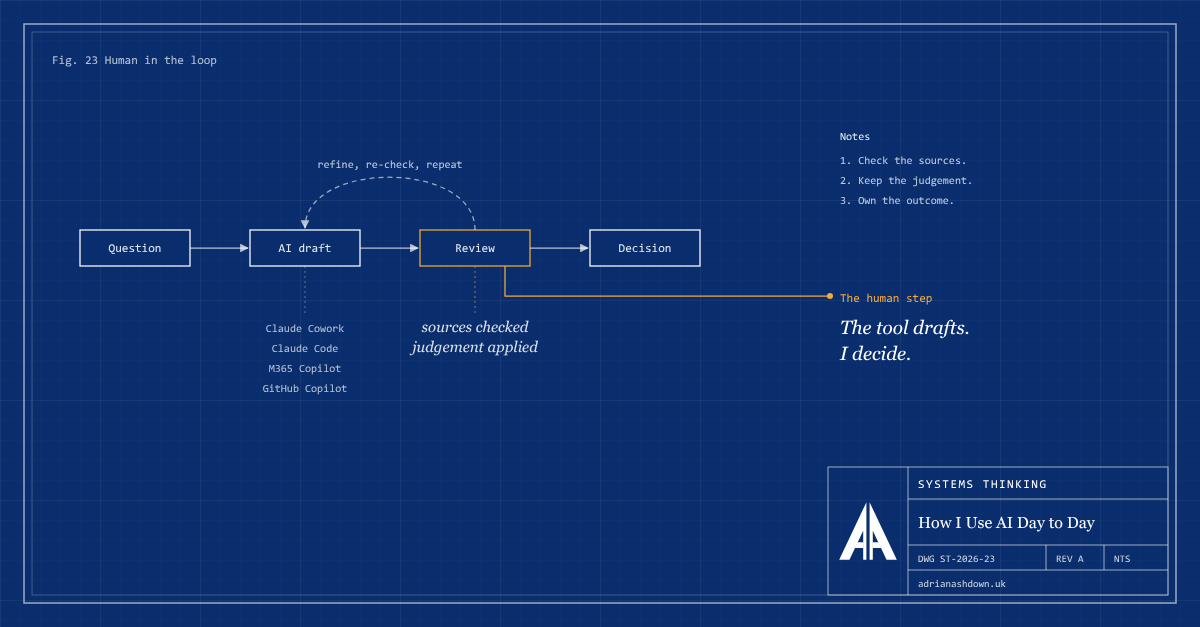
The tools are Claude (mainly through Claude Cowork and Claude Code), Microsoft 365 Copilot and GitHub Copilot. They’re useful in different ways, and none of them replaces the thinking. What they change is how quickly I can get from a question to something worth reviewing.
Everyday business and technical tasks
The most frequent use is also the least glamorous: the regular business and technical tasks that come up week to week. That covers researching a topic before a decision, summarising and comparing options, drafting documents, organising working files, and putting together spreadsheets and other supporting material.
Claude Cowork and Microsoft 365 Copilot both help here. Claude Cowork is particularly useful because it works directly with files and folders rather than only in a chat window, while Microsoft 365 Copilot fits naturally into work already happening in Word, Excel, Outlook and Teams. A task like reorganising a set of working documents, or building a spreadsheet to track content and categories, becomes a conversation: describe the outcome, review what’s produced, correct it, and repeat until it’s right.
Building this site
This website, adrianashdown.uk, was built in collaboration with Claude. That includes:
- The WordPress theme templates and brand. Defining the look of the site, the colour palette, typography and page templates, and then creating them.
- The visual identity. The blueprint-style banner at the top of each article and the homepage hero graphic were generated as code and refined step by step, one change at a time, until they matched what I had in mind.
- The structure. Categories, tags and their descriptions were worked through together and tracked in a spreadsheet, so the site stays organised as it grows.
Working this way is closer to directing a capable assistant than to pressing a button. The ideas, the choices and the final say stay with me; the tool makes it practical to try more options and to iterate faster than I could alone.
Researching and writing architecture content
The articles on this site, and the background reference material that sits alongside them, are researched and written collaboratively with AI. I think it’s worth being open about that.
In practice, the process looks something like this:
- Topic and angle. I decide what to write about and what the article should argue.
- Research and drafting. The AI helps gather material, suggest structure and produce a first draft.
- Review and correction. I review every draft for accuracy, tone and emphasis. That includes checking references and preferring freely available sources where they exist, softening claims that can’t be backed up, and rewording anything that overstates its case.
- Final judgement. Nothing is published until I’m satisfied it says what I mean.
The result is content I stand behind, produced more efficiently than starting from a blank page every time.
Learning and exploring technical projects
The third area is ongoing learning. I use Claude Code and GitHub Copilot to research and explore technical and code projects: understanding unfamiliar libraries, frameworks and patterns, working through examples, and testing ideas in code.
Used this way, AI works well as a patient study partner. It can explain a concept several different ways, produce a worked example to pick apart, or help track down why something doesn’t behave as expected. The learning still happens by reading, running and questioning the code, rather than by accepting it.
The principles behind it
Across all of this, a few principles do most of the work:
AI output is a draft, not an answer. It can be fluent and wrong at the same time. Anything that matters gets reviewed before it’s used.
Sources need checking. Facts, figures and references are verified against the original source wherever possible, rather than trusted because they sound plausible.
Judgement stays with a person. The tool can propose; a person decides. Accountability for the outcome doesn’t transfer to the software.
Data deserves care. What goes into an AI tool matters as much as what comes out. Confidential or personal information needs the same thought as it would with any other third-party service.
The workflow should get simpler, not more complicated. A tool earns its place by removing effort or improving quality. If it adds steps, logins and confusion, it isn’t helping.
Why this matters for architecture
These are the same questions that come up when a business decides how to adopt AI more widely, covered in AI Tools Are Everywhere and AI Costs Out of Control?. What problem does it solve? Where does it fit with existing systems and processes? What happens when it’s wrong, and who checks?
Using these tools day to day keeps those questions practical rather than theoretical. It’s a useful reminder that the value of AI comes less from the technology itself than from how deliberately it’s put to work.